
THE FOUNDING BETA
Be an early leader.
Help shape GazeCut.
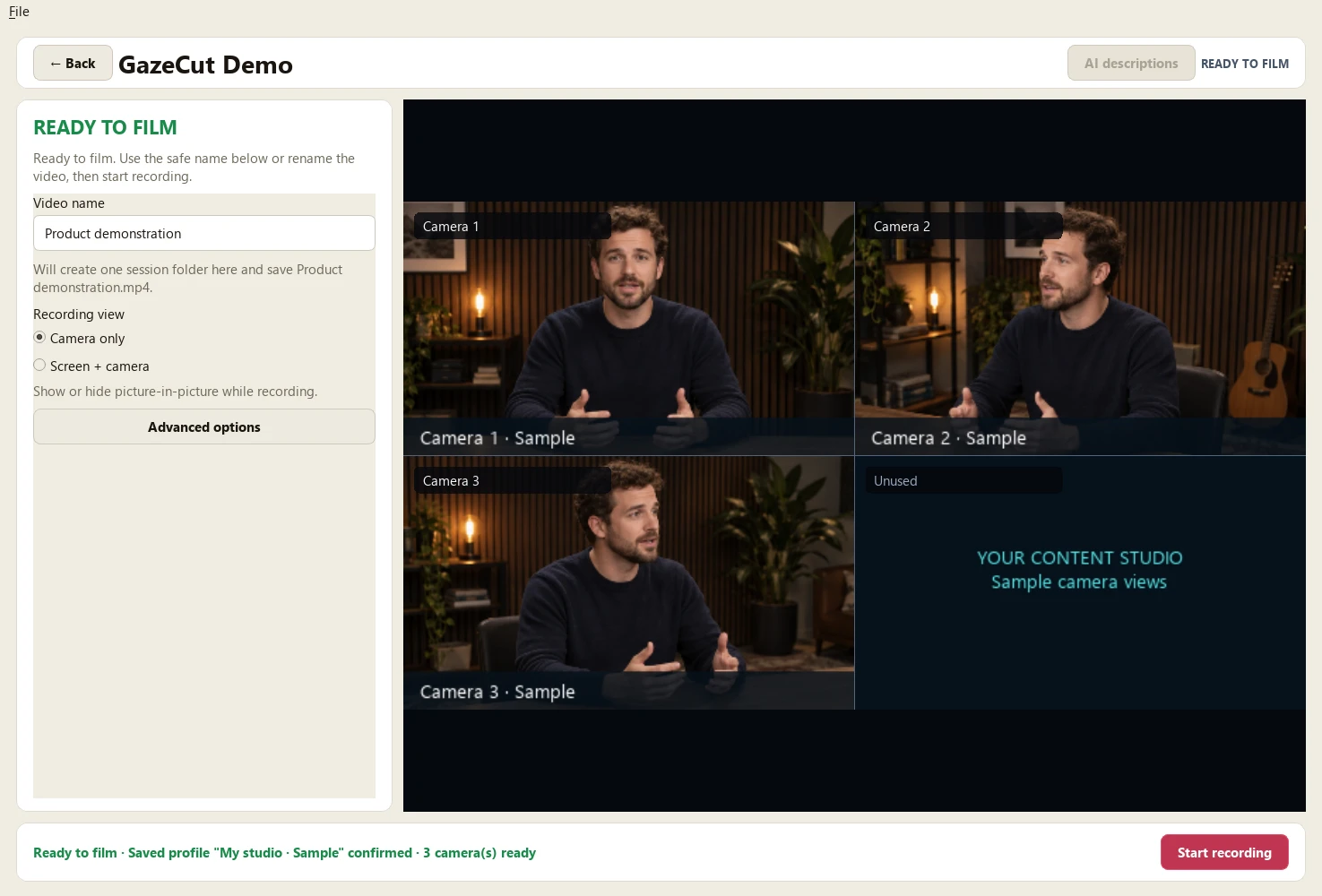
Spend your recording time teaching, explaining and creating. GazeCut follows your head direction to change camera views and saves a finished MP4 on your computer.
CA$149 one time, plus applicable tax. Two activations. Self-service delivery.
See what you getPrefer the full release? Join the early-access list.
14-day money-back guarantee. Available in Canada, the United States, the United Kingdom, Australia and New Zealand.
YOUR FOUNDING ADVANTAGE
Make better use
of your recording time.
Be an early adopter in a founding group of up to 20 buyers. Get the setup guide and beta support. Checkout and automatic delivery are open for supported buyers.
Your experience helps shape the tool. This is an early beta, so expect rough edges. Review the setup guide before purchasing and contact us if you are unsure about your cameras or computer.
Try it with confidence. An unconditional 14-day, no-questions-asked money-back guarantee starts when confirmed payment, usable installer access and self-service licence activation are available. Email support to request your refund.
FOUNDING BETA LICENCE
CA$149 one time, plus applicable tax
- Use it on your setup
- Two device activations.
- Keep the version you buy
- Perpetual use of the purchased major version.
- Help it improve
- 12 months of updates and beta support.
- Get help starting
- A guided camera setup checklist and email support.
Stripe shows the applicable tax and final total before you pay. Review the purchase terms and setup guide first. Checkout closes when all 20 places are sold.
How you will get GazeCutFROM CHECKOUT TO YOUR FIRST VIDEO
A clear path
to getting started.
Checkout is open in Canada, the United States, the United Kingdom, Australia and New Zealand. The final total is shown before you pay.
Check your setup. Then pay.
Review the supported platforms and camera checklist. Stripe checkout shows your one-time purchase total before payment.
Download and install.
After payment is confirmed, checkout opens your private order page and emails the link to you. Download GazeCut and copy the installation code from File > Licence.
Activate. Make your first video.
Enter that code on your private order page, download the signed licence file and import it into GazeCut. The setup guide walks you through a first recording.
Automatic delivery, with support available. You can recover a lost order link through the checkout email. If the link or activation fails, contact GazeCut support. If payment status is unclear, contact us before trying to pay again.
See the setup guideA SMALL GROUP, A REAL WORKFLOW
Built with people
who teach and explain.
We want to hear from educators, consultants, course creators and technical presenters who regularly record themselves at a desk or in a small studio.
- You already use, or want to use, more than one camera.
- You can describe the time you spend syncing footage and choosing camera angles.
- You want to try your own workflow and give direct feedback.
The beta is available for Windows 11 x64 and Ubuntu/Pop!_OS 24.04 x86_64. Review your computer, cameras and permission to install before buying. These are supported platforms, but every camera setup is different. A signed and notarized Mac beta is also available for Apple Silicon. Review its installation guidance before buying.
Walk through your camera setup: connections, picture, sound and your first test recording.
MAC BETA
Tested on Mac.
Built with your feedback.
GazeCut has completed successful physical recording tests on an Apple Silicon Mac. Join the early beta and help shape what comes next, with Adam available directly for setup help, bugs and feature ideas. Requires Apple Silicon and macOS 15.5 or newer. Intel Macs and every camera or hub combination have not been qualified.
Signed and notarized beta: this Mac app is signed with Apple Developer ID and notarized by Apple. Read the Mac installation guide before purchasing, especially on a managed computer.
Mac download and installation guide
Your private order page provides the Mac download and its SHA-256 checksum after checkout. This software uses FFmpeg under LGPLv2.1 or later; third-party source and build information are available.
Email support@gazecut.com with your Mac model, memory, macOS version and camera connections. This starts a conversation; it does not purchase or reserve a licence.
HELP SHAPE GAZECUT
A direct line
to the founder.
Contact Adam when a bug interrupts your recording, or tell him which feature would make your workflow better. Include your GazeCut version, operating system and the steps that reproduce the problem. Leave out private recordings and licence files.
Report a bug or suggest a feature
You can email support@gazecut.com before or after downloading. Feedback helps guide improvements; specific features and fix dates are not guaranteed.
BEFORE YOU DECIDE
A few things
to know.
What does GazeCut do?
Select your cameras and one microphone, calibrate your head direction, then record. GazeCut uses that direction to select camera angles for a finished local MP4 and retains a local source for recovery. It is not precision eye tracking. The setup guide explains the workflow and its limits.
Can I buy and download it today?
Yes, if your billing address is in one of the five supported countries and places remain. Review the delivery steps and setup guide, then use the purchase button above. Your private order page opens after confirmed payment and is also sent by email.
What if GazeCut isn't right for me?
You have a 14-day unconditional, no-questions-asked money-back guarantee. The 14 days start when confirmed payment, usable installer access and self-service licence activation are available. Email support to request a refund. You do not have to give feedback or prove that you uninstalled it.
Do my recordings leave my computer?
Recording and video processing stay on your computer. Optional AI description assistance can send selected transcript text and instructions to a destination you choose, after your approval. It does not upload your video or audio. Core recording does not require a cloud account.
What would you ask of a founder?
Use GazeCut in your own workflow and tell us what helps or gets in the way if you choose. Feedback, sharing recordings and appearing in marketing are optional.
What if I don't get a beta place?
Join the early-access list to be among the first offered a full-release licence when it becomes available. You can also join if you prefer to wait for the full release. There is no payment or obligation, and no confirmed release date or full-release price yet. A beta enquiry does not automatically add you to the list.
Will I have help setting up my cameras?
Yes. Start with our guided setup checklist. Each step tells you what to check and what to try if it fails. Email support is available if you get stuck. Camera capability varies, so test both cameras together before an important take.
YOUR NEXT STEP
Ask about the
founding launch.
Tell Adam what you record, your operating system and how many cameras you use. We can help you assess your setup before you buy. An enquiry has no payment or commitment.
Email about the founding launchEmail support@gazecut.com to ask about your setup.
The link prepares a draft in your mail app. You review and send it yourself. This website does not submit or store an enquiry.
No mail app? Email the address above with the subject "GazeCut founding launch" and a brief description of your setup.
YOUR NEXT OPPORTUNITY
Join the waitlist.
Be early for the release.
Ask to join the early-access list and be among the first offered a full-release GazeCut licence when it becomes available. You can join now, whether or not you enquire about the beta.
Join the waitlist by emailEmail support@gazecut.com to request full-release early access.
This opens an email draft. Review and send it to request a place on the list. Clicking alone does not sign you up; we confirm by reply after receiving your request.
No mail app? Email the address above with the subject "GazeCut early access" and ask to receive the full-release offer.